Contents
Overview
This document provides information about using AD to populate a mail list membership list via the LDAP interface. The University’s AD server, ad.uillinois.edu, contains thousands of entries and refining your query is essential in retrieving useful results. Additional information about the Sympa “LDAP 2-level query inclusion” can be found at: www.sympa.community/manual/customize/data-sources.html
Background
Lightweight Directory Access Protocol (LDAP)
- A standard approach for interacting with distributed directory information services.
LDAP Data Interchange Format (LDIF)
- LDIF defines the protocol used to describe directory information. LDAP clients and services us LDIF to navigate, import, export and describe changes in the directory information.
- Common LDIF fields include:
| Filter | Friendly Name | Function |
| DN: | distinguished name | The name that uniquely identifies an entry in the directory. |
| DC: | domain component | Refers to each component of the domain.
E.g. ad.uillinois.edu is written as: dc:=ad,dc:=uillinois,dc:edu |
| OU: | organizational unit | Organization unit or user group |
| CN: | common name | Name of an individual object (person’s name, meeting room, job title, thing, etc.) for whom/which you are querying |
- LDIF technical details and examples can be found in RFC2849, http://tools.ietf.org/html/rfc2849.
Using LDAP to Populate Mail list Members
- This example constructs an AD query to include member names from the “listmanager” group and their email addresses in the list’s membership list.
- This example also uses a fully qualified username* constructed with LDIF.
CN=Lists_BIND,OU=CITES Mailing Lists,OU=PAG,OU=CITES-Services,OU=CITES,OU=Urbana,DC=ad,DC=uillinois,DC=edu
Access the config page by clicking on: (admin) > Edit List Config > Data sources setup and scroll to “LDAP 2-level query inclusion”.
Admin > Edit List Config > Data sources setup and scroll to “LDAP 2-level query inclusion”.
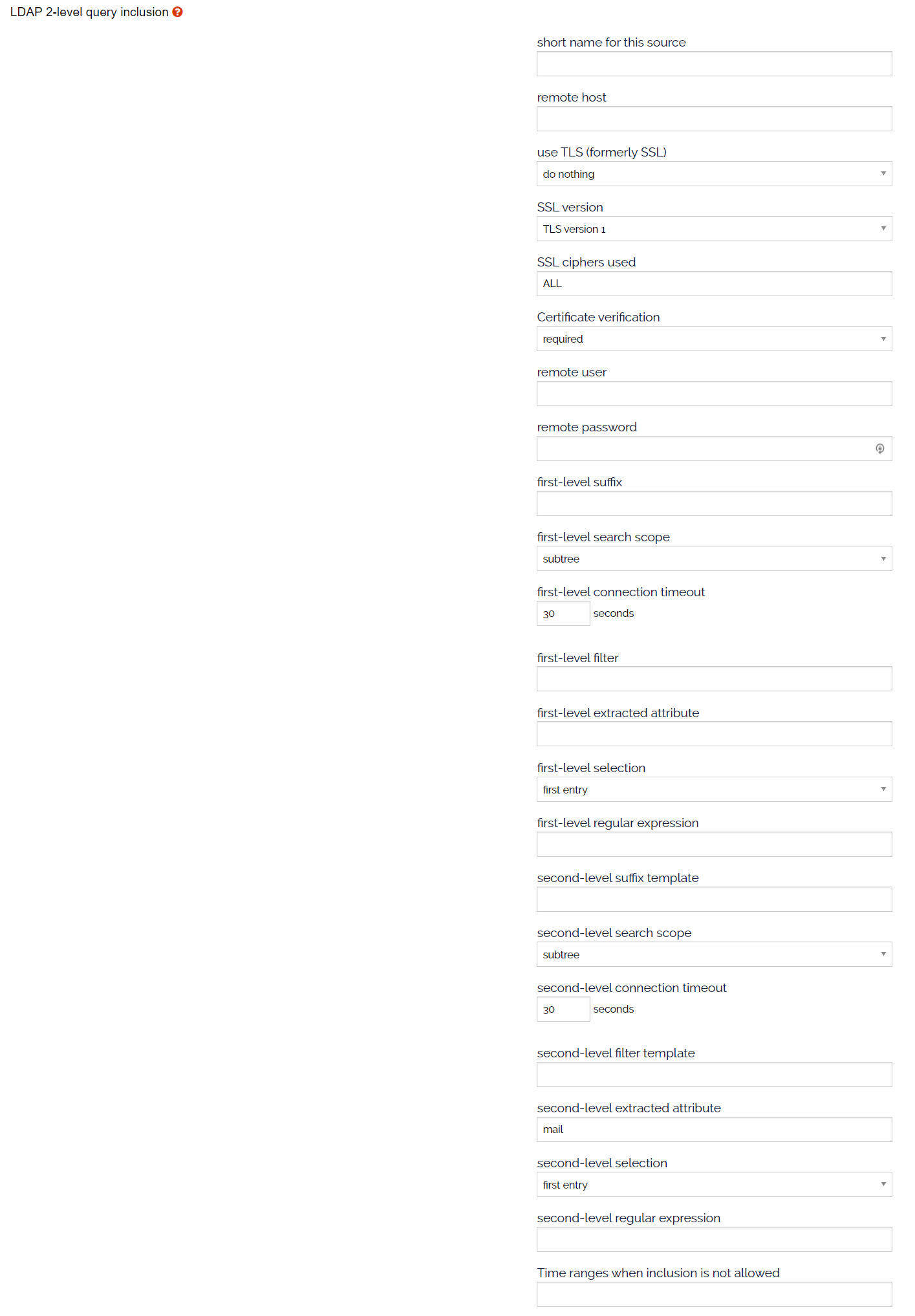
The input fields and values of an example AD query.
| Input Field | Value | Description |
| short name for this source: | yourReferenceName | A human readable name for the data source. (optional) |
| remote host: | ad.uillinois.edu | Name of ad server. or ldap.ad.uillinois.edu |
| SSL ciphers used: | ALL | The ciphers used to connect to server (default=ALL) |
| use SSL (LDAPS) | yes | Uses LDAPS protocol when communicating with server |
| SSL version: | tls | Defines which version of ssl is used. |
| remote user: | CN=Lists_BIND,OU=CITES Mailing Lists,OU=PAG,
OU=CITES-Services,OU=CITES,OU=Urbana,DC=ad,DC=uillinois,DC=edu |
This username references a service account that is defined in the LDAP directory. |
| remote password: | User’s password | The user’s password. |
| first-level suffix: | CN=UserGroupName,OU=GroupName?,OU=YourTargetSubOrgName,
OU=YourTargetOrgName,OU=Urbana,DC=ad,DC=uillinois,DC=edu |
define the path to the LDAP entry/directory that contains your target user group. |
| first-levels search scope | sub | Search scope
base: search only the base object one: search 1 level below base object sub: search whole tree below base object |
| first-level connection timeout: | 90 | Timeout when connection to server. (seconds) |
| first-level filter: | (objectClass=group)
e.g. (&(cn=[put the name of your remote user here])(objectClass=group)) |
The LDAP search filter/query |
| first-level extracted attribute: | member | The attribute to be returned (users name) |
| first-level selection: | all | Defines what attribute to use:
first – only the first attribute value all – use all attribute values. regex – use value matching the defined regular expression. |
| first-level regular expression: | The regular expression used for matching values. | |
| second-level suffix template: | [attrs1] | The data object returned by the first-level query to be used in the second-level query |
| second-level search scope: | base | Search scope
base: search only the base object one: search 1 level below base object sub: search whole tree below base object |
| second-level connection timeout: | 90 | Timeout when connection to server. (seconds) |
| second-level filter template: | (objectClass=person) | The LDAP search filter/query |
| second-level extracted attribute: | The attribute to be returned (email address) | |
| second-level selection: | first | Defines what attribute to use:
first – only the first attribute value all – use all attribute values. regex – use value matching the defined regular expression. |
| second-level regular expression: | The regular expression used for matching values. |
Basic Example LDAP Query
Reading through the configuration query we have: a remote data source LDAP 2-level query called “testing_listmgr” and contacts “ad.uillinois.edu” using “all” available ciphers via “SSL” using SSL version “tls”. The query will connect to the server as user “Lists_BIND” who belongs to a specific organization. The first-level query will traverse to the location of the target group “CN=UserGroupName,OU=GroupName?,OU=YourTargetSubOrgName,OU=YourTargetOrgName,OU=Urbana,DC=ad,DC=uillinois,DC=edu” and will traverse the entire tree “sub” below ad.uillinois.edu looking for the “member” object for “all” objects. The second-level query will take the result from the first-level “[attrs1]” and search for the “mail” attribute of the person object, but will only take the “first” email address it finds and return the result to Sympa to be included in the mail list membership list.
How often does the Campus Mailing List server sync with LDAP?
The sync is controlled by two settings at the bottom of this config page:
– inclusion timeout (default = 86,400 seconds or 24 hrs)
– inclusion timeout for message distribution (default = 5 minute)
In this case, Sympa will query the LDAP server on a daily basis AND it also checks before a message is distributed to the list. If the sync has exceeded 5 minutes from the last update then Sympa will sync again before message distribution and the subscriber list will never be more than 5 minutes stale.
The privileged owner can change these settings to meet their needs.
Active Directory – Tools and Syntax
LDAP Tools
We recommend you install an LDAP admin tool to help navigate the AD space. Useful tools include:
- Apache Directory Studio – http://directory.apache.org/
- Microsoft’s “Active directory Users and Computers” utility that is available from the “Microsoft Remote Server Administration Tools”
Both tools are freely available and will let you navigate the LDAP directory structure to help create useful queries. Below is a screenshot of Microsoft’s utility. Refining the search space using LDIF and specific queries is key to useful results.
LDAP Syntax
Microsoft LDAP queries and syntax specific to AD can be found at: http://social.technet.microsoft.com/wiki/contents/articles/5392.active-directory-ldap-syntax-filters.aspx